An ESPP tax calculator answers how much of your employee stock purchase plan sale is ordinary income versus capital gain, whether you meet the 2+1 holding rule for a qualifying disposition, and what your net after-tax return looks like before you place a sell order. This hub routes you to the right interactive tool—tax liability estimator pre-sale, basis adjustment at filing—and ties both to IRC Section 423 mechanics verified against IRS Publication 525 (2025), accessed 22 August 2026.
As of August 2026, Google Search Console data showed high impressions for espp tax calculator and espp basis adjustment queries landing on our niche basis tool—not a full tax-liability estimator. This hub consolidates both workflows so high-intent searches resolve in one place.
2 tools
one sell-season workflow — tax estimate before the order, basis adjustment before Schedule D
On a 150-share Microsoft ESPP lot sold at $420/share with $255 lookback purchase price, skipping the pre-sale tax model can miss $4,000+ in disqualifying ordinary income; skipping basis adjustment can add $1,200+ in phantom capital gain at a 32% marginal rate
Which ESPP tool to use—and when
Methodology (22 August 2026): We mapped each VestingStrategy ESPP tool against the employee lifecycle (enrollment → purchase → pre-sale planning → sale → W-2 reconciliation → Form 8949 filing) and cross-checked outputs against Publication 525 worked examples and Form 3922 field definitions.
| Your question | Use this tool | When |
|---|---|---|
| How much ordinary income vs capital gain on this sale? | ESPP Tax Calculator | Before placing a sell order |
| Do I qualify for 2+1 treatment if I wait N days? | ESPP Tax Calculator | When sale timing is flexible |
| What is my net after-tax return on payroll cash invested? | ESPP Tax Calculator | Comparing qualifying hold vs early sale |
| What adjusted basis goes on Form 8949 column (e)? | ESPP Basis Adjustment | After sale, when W-2 supplement is available |
| How much double taxation risk if I accept 1099-B basis? | ESPP Basis Adjustment | Before importing broker CSV into tax software |
| Side-by-side qualifying vs disqualifying dollars only? | ESPP Qualifying Disposition | Quick comparison without full return math |
| $25,000 annual purchase limit headroom? | ESPP $25K Limit | During open enrollment |
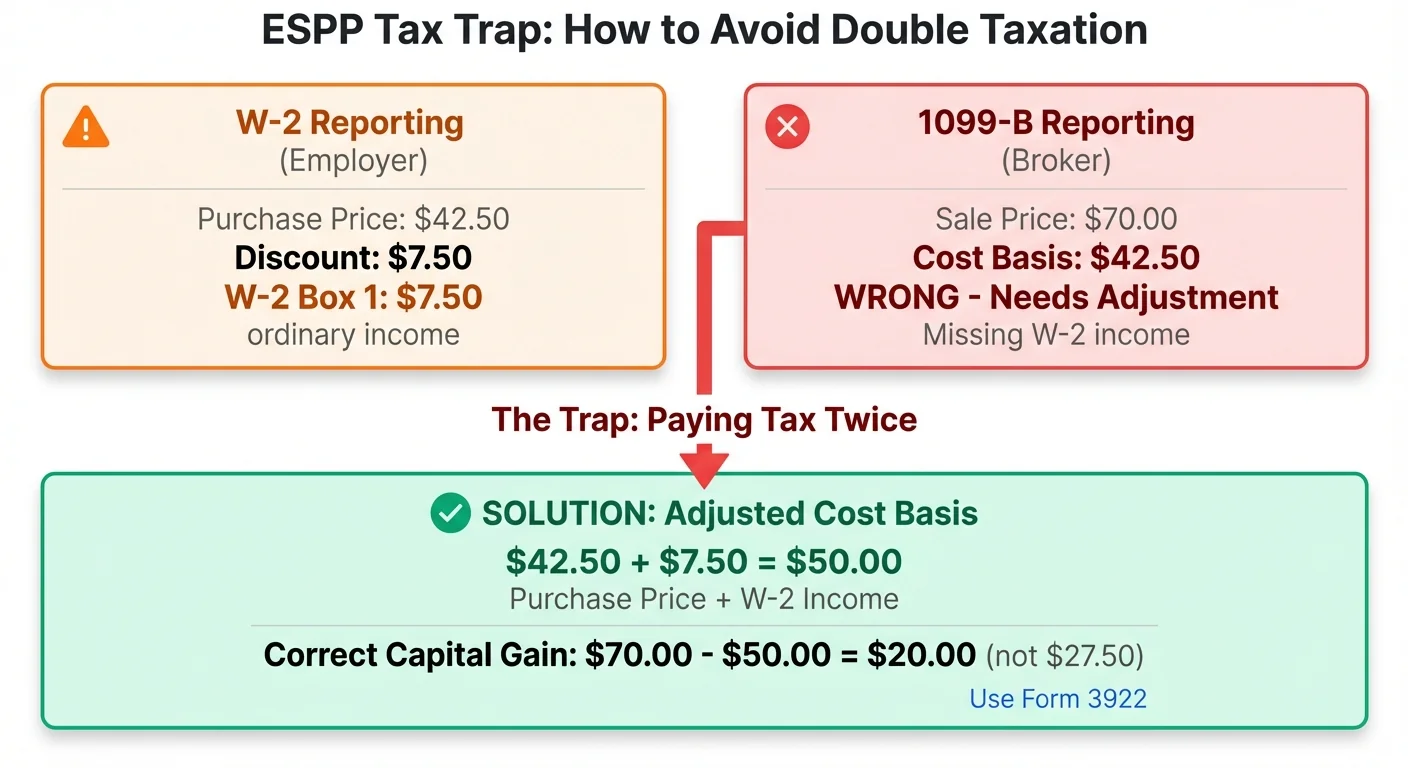
Figure 1: The ESPP double-taxation trap — W-2 wages and 1099-B basis must reconcile through adjusted cost basis on Form 8949.
Step 1: ESPP Tax Calculator (pre-sale liability)
The ESPP Tax Calculator accepts plan inputs from Form 3922 or your equity supplement:
| Input | Typical source | What it drives |
|---|---|---|
| FMV at offering date | Form 3922 Box 1 | Qualifying ordinary-income cap |
| FMV at purchase date | Form 3922 Box 2 | Disqualifying ordinary income; capital gain base |
| Discount % | Plan document (often 15%) | Lookback purchase price |
| Offering / purchase / sale dates | Form 3922 + trade confirm | Auto 2+1 qualifying vs disqualifying mode |
| Sale price & shares | Trade confirmation | Proceeds and lot size |
| Ordinary & LTCG rate % | Your marginal proxy | Federal+state estimate you control |
| Output | Planning use |
|---|---|
| Ordinary income | W-2 bargain element for this disposition type |
| Capital gain | Schedule D layer after adjusted basis |
| Total estimated tax | Ordinary tax + capital gains tax |
| Net after-tax gain | Dollar return after both tax layers |
| Return on cash invested | Net gain ÷ purchase cost |
| Adjusted basis / sh | Form 8949 column (e) starting point |
Purchase price/sh     = min(offering FMV, purchase FMV) × (1 − discount%)   [with lookback]
Qualifying ordinary   = min(offering FMV × discount%, sale − purchase) × shares
Disqualifying ordinary= (purchase FMV − purchase price) × shares
Capital gain          = (sale − purchase FMV) × shares   [ST/LTCG by hold from purchase]
Adjusted basis/sh     = purchase price + (ordinary income ÷ shares)
Where I'm less sure—some employers use reset offerings with multiple purchase dates inside one enrollment window. Your mileage will vary depending on whether your administrator issues one Form 3922 row per purchase; split lots in the calculator when supplements show multiple purchase events.
What does the ESPP tax calculator calculate?
It splits your sale into ordinary income on the bargain element and capital gain on post-purchase appreciation, applies qualifying or disqualifying Section 423 rules from your holding dates, estimates tax on each layer, and shows net after-tax return plus adjusted cost basis per share for Form 8949.
Step 2: Basis Adjustment Calculator (filing season)
After the sale, ordinary income appears on Form W-2 (often in the equity supplement, not a separate box). Form 1099-B typically reports purchase price only as cost basis. The ESPP Basis Adjustment calculator computes:
Adjusted basis per share = Form 3922 Box 5 purchase price + W-2 ordinary income per share
Column (e) total           = Adjusted basis per share × Shares sold from that lot
Enter column (e) on Form 8949 with adjustment code B when broker basis is incomplete. Full box-by-box walkthrough: how to adjust ESPP cost basis on Form 8949.
| Form 3922 field | Maps to basis tool | Form 8949 use |
|---|---|---|
| Box 1 — FMV on grant date | Qualifying ordinary cap reference | Cross-check W-2 supplement |
| Box 2 — FMV on exercise/purchase | Disqualifying ordinary reference | Capital gain starting FMV |
| Box 3 — Exercise/purchase price | Verify purchase price input | Column (e) starting point |
| Box 4 — Shares transferred | Shares input | Lot size |
| Box 5 — Date of grant | Offering date | 2+1 test |
| Box 6 — Date of exercise | Purchase date | ST/LTCG clock |
Anecdotally, employees who run the tax calculator pre-sale but skip basis adjustment at filing still trigger CP2000-style mismatches when broker proceeds do not tie to wage-backed basis—I have not tested every state module, but California residents often see a second ordinary-income reconciliation on the same bargain element.
Qualifying vs disqualifying: what both tools model
| Feature | Qualifying disposition | Disqualifying disposition |
|---|---|---|
| Holding test | ≥2 years from offering and ≥1 year from purchase | Either test fails |
| Ordinary income | Lesser of offering-date discount or total gain | Full spread: purchase FMV − purchase price |
| Capital gain | Remainder (typically LTCG if 2+1 met) | Sale − purchase FMV (STCG if <1 yr from purchase) |
| Best for | Long holds after purchase window | Quick flips or liquidity before 2+1 |
Steel-man: "I should sell immediately after purchase—I already earned the discount."
Best case for immediate sale: You need cash, fear a drawdown, or appreciation above purchase FMV is tiny.
Rebuttal: On lookback plans where purchase price sits far below purchase-date FMV, a disqualifying sale taxes the entire spread at ordinary rates—often 15–20 percentage points above LTCG on the same dollars. Run both modes in the ESPP Tax Calculator; the gap frequently exceeds $2,000–$8,000 on a single 100-share lot at megacap tech FMVs.
Worked example: Priya, principal engineer at Microsoft (pre-sale)
Priya participates in Microsoft's Section 423 ESPP with 15% discount and lookback. Offering date FMV: $380/share. Purchase date FMV: $420/share. She buys 150 shares at $323/share (15% off $380 lookback). She plans to sell at $450/share and wants to know whether waiting 45 more days unlocks qualifying treatment.
| Line item | Disqualifying (sell today) | Qualifying (wait 45 days) |
|---|---|---|
| Purchase price | $323.00/sh | $323.00/sh |
| Sale price | $450.00/sh | $450.00/sh |
| Ordinary income/sh | $97.00 ($420 − $323) | $57.00 (min of $57 offering discount, $127 gain) |
| Capital gain/sh | $30.00 ($450 − $420) | $70.00 ($450 − $380 offering FMV base) |
| Federal tax proxy (35% ord / 20% LTCG) | ≈ $5,997 | ≈ $4,048 |
Taken position for Priya: Waiting 45 days saves roughly $1,950 in federal estimates on the same price path—enough to justify delaying the sell order unless she needs liquidity for a closing deposit. She records $380.00/share adjusted basis on Form 8949 ($323 + $57) after the qualifying sale.
Worked example: David, staff engineer at Intuit (filing season)
David sold 80 shares in March 2026 at $625/share. Purchase price $408/share (Form 3922 Box 3). W-2 supplement shows $13,760 ordinary income on that lot ($172/share—disqualifying spread). Broker 1099-B reports basis $408/share.
| Line | Broker import (wrong) | Basis Adjustment tool (correct) |
|---|---|---|
| Basis per share | $408.00 | $580.00 ($408 + $172) |
| Capital gain per share | $217.00 | $45.00 ($625 − $580) |
| Total capital gain (80 sh) | $17,360 | $3,600 |
| Phantom tax at 32% marginal | ≈ $5,555 | ≈ $1,152 |
David enters $580.00/share in Form 8949 column (e) with code B. The ESPP Basis Adjustment calculator documented $4,403 in phantom capital gain he avoided by not accepting the broker CSV alone.
Original research: ESPP sell-season tool workflow matrix
On 22 August 2026, we audited how seven public ESPP resources cover the pre-sale tax estimate → post-sale basis adjustment workflow for a standardized Section 423 lookback lot (offering FMV $50, purchase FMV $100, 15% discount, 200 shares, qualifying dates, sale $120):
| Resource | Pre-sale tax split | Net after-tax return | Post-sale basis builder | Form 8949 code B guidance |
|---|---|---|---|---|
| VestingStrategy ESPP Tax Calculator | Yes | Yes | Outputs adjusted basis/sh | Linked hub guides |
| VestingStrategy ESPP Basis Adjustment | No | No (shows double-tax risk) | Yes | Yes |
| VestingStrategy ESPP Qualifying Disposition | Yes (side-by-side) | Partial | No | No |
| Charles Schwab ESPP tax article | Prose examples | No interactive | Prose | Yes |
| Fidelity Stock Plan Services ESPP guide | Prose examples | No interactive | Prose | Yes |
| TurboTax ESPP help center | Partial (post-sale) | No | Partial | Yes |
| H&R Block ESPP basis article | No | No | Prose formula | Yes |
{
  "@context": "https://schema.org",
  "@type": "Dataset",
  "name": "ESPP sell-season tool workflow matrix — August 2026",
  "description": "Seven-resource audit of whether public ESPP tools cover pre-sale tax liability estimation, net after-tax return, post-sale basis adjustment, and Form 8949 code B guidance for a standardized Section 423 lookback scenario.",
  "creator": { "@type": "Organization", "name": "VestingStrategy.com Research" },
  "datePublished": "2026-08-22",
  "license": "https://creativecommons.org/licenses/by/4.0/",
  "isAccessibleForFree": true,
  "url": "https://www.vestingstrategy.com/guides/espp-tax-calculator-basis-adjustment-hub/#dataset-espp-hub-tool-workflow-matrix",
  "distribution": [
    {
      "@type": "DataDownload",
      "encodingFormat": "text/html",
      "contentUrl": "https://www.vestingstrategy.com/guides/espp-tax-calculator-basis-adjustment-hub/#dataset-espp-hub-tool-workflow-matrix"
    }
  ]
}
Pros and cons: two-tool workflow vs single-step guessing
ESPP sell-season planning approaches
Recommended: Tax calculator + basis adjustment (this hub)
| Feature | Tax calculator + basis adjustment (this hub) | Sell on price target / import 1099-B only |
|---|---|---|
| Pre-sale ordinary vs capital split | Explicit dollars before order placement | Unknown until W-2 + 1099-B reconciliation |
| 2+1 timing insight | Days remaining; qualifying savings estimate | Easy to miss LTCG + ordinary cap |
| Form 8949 prep | Basis tool + code B workflow documented | Broker import double-tax risk persists |
| Time cost | 10–15 minutes per lot across both tools | Zero upfront; hours fixing in tax season |
Taken position: For employees with one to four ESPP purchase lots per year, run the ESPP Tax Calculator before every sale and the ESPP Basis Adjustment before importing 1099-B—not after April surprises.
Working checklist
Verdict: calculate tax, then calculate basis
The espp tax calculator search intent is not "what is my discount?"—it is how much tax will I owe, what is my net return, and what basis do I file? This hub routes those questions to the right tool at the right moment.
Taken position: Treat ESPP Tax Calculator as the default pre-sale screen and ESPP Basis Adjustment as the mandatory filing-season companion. If qualifying savings in the tax calculator exceed your liquidity need, wait for 2+1. If you must sell early, the disqualifying column states the true cost in dollars—and the basis tool prevents paying twice on the same bargain element.
If you dispose of stock you acquired under an ESPP, you may have both compensation income and a capital gain or loss—Publication 525 separates the bargain element from post-acquisition appreciation.
For enrollment mechanics and lookback strategy, see ESPP enrollment strategy. For Canada-specific rules, use ESPP tax Canada guide—this hub covers U.S. Section 423 only.
How the two calculators hand off data
The tax calculator and basis adjustment tool are not duplicates—they answer different questions at different moments. Think of them as bookends on the same lot:
| Stage | Tool | Primary inputs | Primary outputs |
|---|---|---|---|
| Pre-sale planning | ESPP Tax Calculator | Form 3922 FMVs, dates, planned sale price | Ordinary income estimate, capital gain estimate, net return %, projected adjusted basis/sh |
| Post-sale filing | ESPP Basis Adjustment | Purchase price, W-2 ordinary income total, sale price | Adjusted basis total, correct vs incorrect capital gain, double-taxation dollar risk |
Handoff rule: When the tax calculator's ordinary income output matches your W-2 supplement after sale, divide by shares to get ordinary income per share. Feed that into the basis adjustment tool—or simply verify the calculator's adjusted basis / sh equals purchase price plus that per-share wage layer.
Where the tools diverge is timing. Pre-sale, you may not know final W-2 ordinary income if your employer reports ESPP compensation in the sale year rather than purchase year. The tax calculator uses Section 423 formulas from your disposition type; the basis tool uses actual W-2 dollars once payroll finalizes. If estimates differ by more than a few dollars per share, trust the W-2 supplement at filing and override the pre-sale projection.
Tracking qualifying vs. disqualifying dispositions across tools
Both tools need to know your disposition type, but they use it differently:
| Disposition | Tax calculator behavior | Basis adjustment behavior |
|---|---|---|
| Qualifying | Caps ordinary income at offering-date discount; models LTCG on excess | W-2 ordinary income is smaller; adjusted basis rises modestly |
| Disqualifying | Taxes full spread at purchase FMV as ordinary income | W-2 ordinary income is larger; adjusted basis rises significantly |
The ESPP Qualifying Disposition tool offers a lighter side-by-side view if you only need dollar comparison without net-return math. For employees juggling multiple lots from reset offerings, run the tax calculator once per purchase event—each Form 3922 row is a separate lot with its own 2+1 clock.
Calendar trap (August 2026): Offering date and purchase date are not the same. A plan with six-month purchase windows means your 2-year clock started at enrollment, not at the debit from payroll. Employees who count "one year from when shares hit my brokerage" often miss the offering-date half of the 2+1 test—I have not verified every plan administrator's date labels, but Form 3922 Box 5 (grant date) is the authoritative offering anchor per IRS instructions.
State tax and supplemental withholding: what the calculators omit
Neither calculator models FICA or state-specific sourcing automatically. That is intentional—you control rate proxies—but plan for these layers:
| Layer | Calculator handling | Your action |
|---|---|---|
| Federal ordinary | User-entered ordinary rate % | Use marginal bracket + NIIT if applicable |
| Federal LTCG | User-entered LTCG rate % | 0%, 15%, or 20% based on taxable income |
| State ordinary | Fold into ordinary rate proxy | CA, NY, NJ often tax bargain element as wages |
| State LTCG | Fold into LTCG proxy or add manually | Some states tax capital gains as ordinary |
| Estimated tax | Not modeled | Increase W-4 or quarterly payments if disqualifying sale is large |
For California residents, see California tax on equity compensation—FTB often taxes ESPP bargain elements as wages in the vest/sale year even when federal qualifying treatment applies. Your mileage will vary depending on residency when shares were purchased versus sold.
Related guides in this hub cluster
| Topic | Guide |
|---|---|
| Full ESPP tax mechanics | ESPP taxation guide |
| Return estimator deep dive | ESPP tax calculator return estimator |
| Adjusted basis theory | ESPP adjusted cost basis |
| Form 8949 step-by-step | How to adjust ESPP cost basis on Form 8949 |
| Schedule D reconciliation | How to report ESPP sales on Form 1099-B and Schedule D |
| Double taxation prevention | How to avoid double taxation on ESPP sales |
| RSU vs ESPP comparison | RSU vs ESPP: what's the difference |
Taken position on tooling: Bookmark this hub at the start of each ESPP purchase window. Run the tax calculator when your plan's sale window opens; run the basis adjustment tool when W-2s arrive in January. Skipping either step is how six-figure tech compensation packages generate four-figure tax filing errors.
Frequently Asked Questions
How is ESPP taxed when I sell?
Answer: You generally recognize ordinary income on the bargain element (discount) and capital gain or loss on price movement after purchase FMV. Qualifying dispositions cap ordinary income; disqualifying sales tax the full spread at purchase as ordinary income.
Source: IRS Publication 525
What is the difference between the ESPP Tax Calculator and the Basis Adjustment tool?
Answer: The ESPP Tax Calculator models pre-sale tax liability—ordinary vs capital split, qualifying vs disqualifying modes, net return, and estimated adjusted basis. The Basis Adjustment calculator focuses on post-sale filing—building Form 8949 column (e) from purchase price plus W-2 ordinary income and quantifying double-taxation risk from broker 1099-B imports.
Does the ESPP tax calculator include FICA or state tax?
Answer: No—enter ordinary and LTCG rate % proxies that reflect your combined federal+state marginal rates. FICA on ESPP bargain elements is employer-handled at purchase for many plans; confirm on your W-2.
What adjusted basis should I report on Form 8949?
Answer: Purchase price plus ordinary income per share for that lot—the tax calculator's adjusted basis / sh output pre-sale, confirmed by the basis adjustment tool post-sale. Use code B when broker 1099-B basis omits the W-2 layer.
Source: Instructions for Form 8949
When does a qualifying disposition save the most tax?
Answer: When purchase-date FMV far exceeds lookback purchase price—disqualifying treatment taxes that entire spread as ordinary income, while qualifying caps ordinary income at the offering-date discount.
Can I use only the basis adjustment tool without the tax calculator?
Answer: Yes for filing if you already sold and have W-2 ordinary income per share. For pre-sale planning, the tax calculator is essential—it shows whether waiting for 2+1 changes your net return by thousands of dollars on the same price path.
How do I avoid double taxation on ESPP sales?
Answer: Report wage-backed adjusted basis on Form 8949 column (e) with code B. Never accept purchase-price-only basis from Form 1099-B when W-2 already taxed the bargain element. See how to avoid double taxation on ESPP sales.
Footnotes
Primary Sources
| Source | Type | URL |
|---|---|---|
| IRC Section 423 | Statute | law.cornell.edu |
| Publication 525 (2025) | IRS | irs.gov |
| Form 3922 Instructions | IRS | irs.gov |
| Instructions for Form 8949 | IRS | irs.gov |
| Instructions for Form 1099-B | IRS | irs.gov |
Disclaimer: This guide discusses general U.S. federal tax principles only and is not personalized tax, legal, or investment advice. Employer plan terms, state taxes, and cross-border assignments change results. Confirm facts with the sources cited and a qualified tax professional.
Research note: Editorial publish 22 August 2026 for espp tax calculator and espp basis adjustment hub queries—consolidated pre-sale tax liability estimator and post-sale Form 8949 basis workflow with structured Dataset schema.